
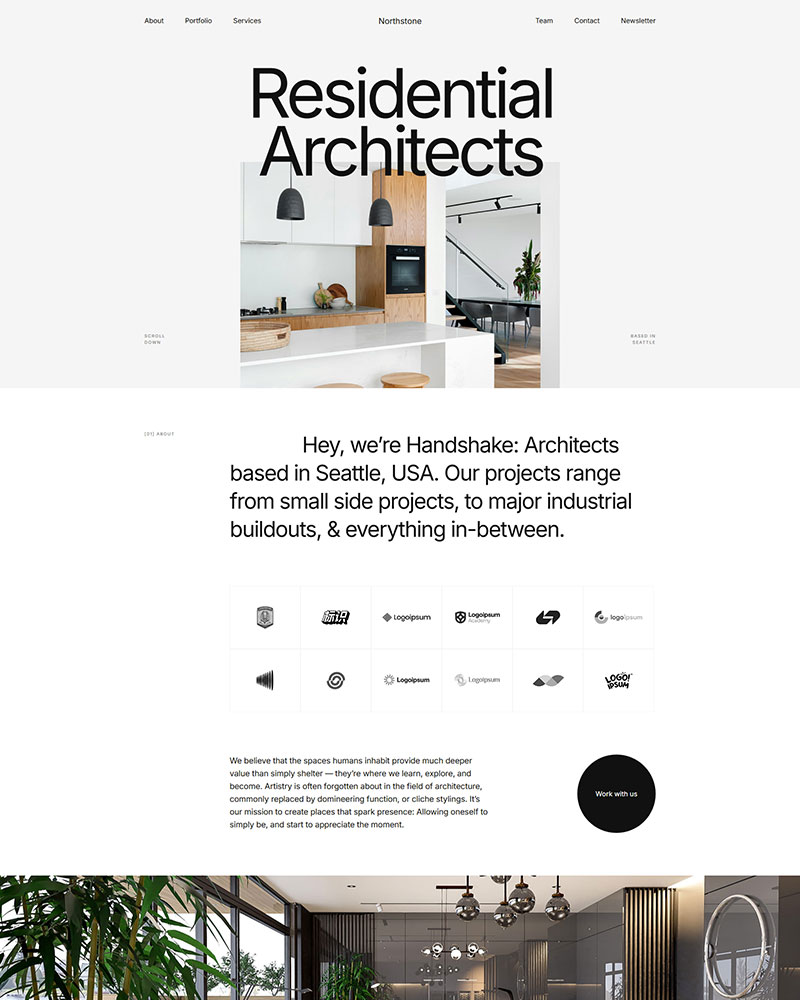

What is the Architect Elementor Template?
The Architect Elementor Template is a premium WordPress layout for architecture firms, interior designers and design studios that need to showcase completed projects rather than list services. It unlocks with a Spexo Pro license and works with Elementor and Spexo Addons. Each project gets its own section for photography, floor plans and a short case study.
Who the Architect Elementor Template is for
Architecture studios, interior design firms and residential architects use this template to lead with project photography instead of stock imagery. Landscape architects and renovation companies can use the same project sections for site plans and completed renovation photos. Design agencies that handle architecture branding alongside other creative work can use the flexible section layout for mixed portfolios. Furniture designers and boutique design studios can adapt the same project format to show individual pieces instead of full buildings.
What’s included in the Architect template
- Home page with a wide hero and a featured project slider
- Project gallery page with filterable categories for residential, commercial and renovation work
- Individual project template with photography, floor plans and a case study layout
- About page for firm history, team profiles and credentials
- Services page for design phases including concept, planning, permitting and construction oversight
- Contact page with map, office hours and a project inquiry form
- Blog and single post layouts for firm news and completed project write ups
- Header and footer designs including a sticky variant
Key features for architecture websites
Project case study layout. Every project gets a dedicated layout instead of a single gallery thumbnail. You can pair photography with floor plans, a brief project summary and the scope of work. Visitors reviewing your practice can see the story behind a build, not just a slideshow.
Filterable project gallery. The gallery page splits projects into categories such as residential, commercial and renovation work. A visitor researching one project type can filter straight to relevant examples. Firms with a broad portfolio keep strong work visible instead of buried under unrelated categories.
Service and process breakdown. The services page lays out each phase of a project, from initial concept through permitting and construction oversight. Clients unfamiliar with the design process can see what happens at each stage before they contact the firm. This reduces the number of basic process questions during a first consultation.
Team and credentials display. The about page includes a team grid, firm history section and a credentials or certifications block. Prospective clients can verify licensure, awards and years in practice before scheduling a call. Small firms and solo architects can use the same layout to build trust without a large team page.
How to install the Architect Elementor Template
Setting up the Architect Elementor Template takes a few minutes from the WordPress dashboard to a published project page.
- Install the free Spexo theme from WordPress.org
- Install Spexo Addons for Elementor and activate a Spexo Pro license
- Open Spexo Addons and select Prebuilt Websites
- Find Architect in the template library and click Import Site
- Add your project photography, floor plans and firm bio. Then publish the site.
Architect Elementor Template vs building from a blank starter theme
Starting from Hello Elementor or a blank Astra starter theme puts you in front of an empty canvas with no project layout to guide the design. Every gallery, case study section and services page needs to be built from nothing. That can take a solo architect several weekends of setup before any real project content goes online. The Architect Elementor Template ships with those sections already structured. You edit existing project layouts instead of designing them from scratch. The tradeoff is a Spexo Pro license, which still costs less than most paid ThemeForest architecture kits built for the same audience. Design studios that handle architecture branding alongside broader creative work can pair this with the Design Agency Elementor Template.
| Comparison point | Architect Elementor Template | Blank starter theme | Paid ThemeForest architecture kit |
|---|---|---|---|
| Cost | $39 a year with Spexo Pro (single site) | Free | $19 to $29 |
| Project gallery layout | Included | Build from scratch | Included |
| Case study sections | Included | Build from scratch | Varies by kit |
| Elementor compatibility | Free Elementor | Free Elementor | Often needs Elementor Pro |
| Setup time | Under an hour | Several weekends | A few hours |
Live preview and screenshots
See the Architect Elementor Template in action before you import it. The live preview includes the homepage, project gallery and a sample project page filled with placeholder photography so you can judge the layout before adding your own work.
Frequently asked questions
Is the Architect Elementor Template free?
No. The Architect Elementor Template is a Pro template included with a Spexo Pro license. Single site pricing starts at $39 a year. The free Spexo Addons plugin and free Spexo theme do not include this template on their own.
Do I need Elementor Pro to use the Architect Elementor Template?
No. The template runs on the free version of Elementor once you unlock it through a Spexo Pro license. Spexo Addons supplies the gallery, form and layout widgets used across the project and services pages. An Elementor Pro subscription is not required to get started.
Can I add my own project photos and floor plans?
Yes. Each project section is built to hold multiple images. You can drop in your own photography, floor plans and renderings. The layout adjusts automatically as you add or remove images from a project.
Does the template support a filterable project gallery?
Yes. The gallery page ships with category filters set to residential, commercial and renovation by default. You can rename or add categories that match how your firm organizes past work.
Is the Architect Elementor Template mobile responsive?
Yes. Project galleries, floor plan images and the services timeline all adjust for phones and tablets automatically. A client reviewing your portfolio on a phone sees the same project detail as someone on a desktop.
Can I customize the colors and fonts without coding?
Yes. Colors, fonts and section spacing are all editable through the Elementor panel. Many architecture firms swap the default palette for a neutral or concrete tone that matches their brand instead of a bright accent color.
Can I use this template for interior design or landscape architecture instead of building architecture?
Yes. The same project layout works for interior design, landscape architecture and renovation firms. Only the category labels and sample images need to change since the underlying section structure fits any portfolio organized by individual projects.
Get started with the Architect Elementor Template
Preview the live demo to see the layout in place. Unlock the template with a Spexo Pro license when you are ready to add your own projects. Once the site is live, explore the Post Grid and Slider widget for building out additional project carousels.




