What is the News Portal Elementor Template?
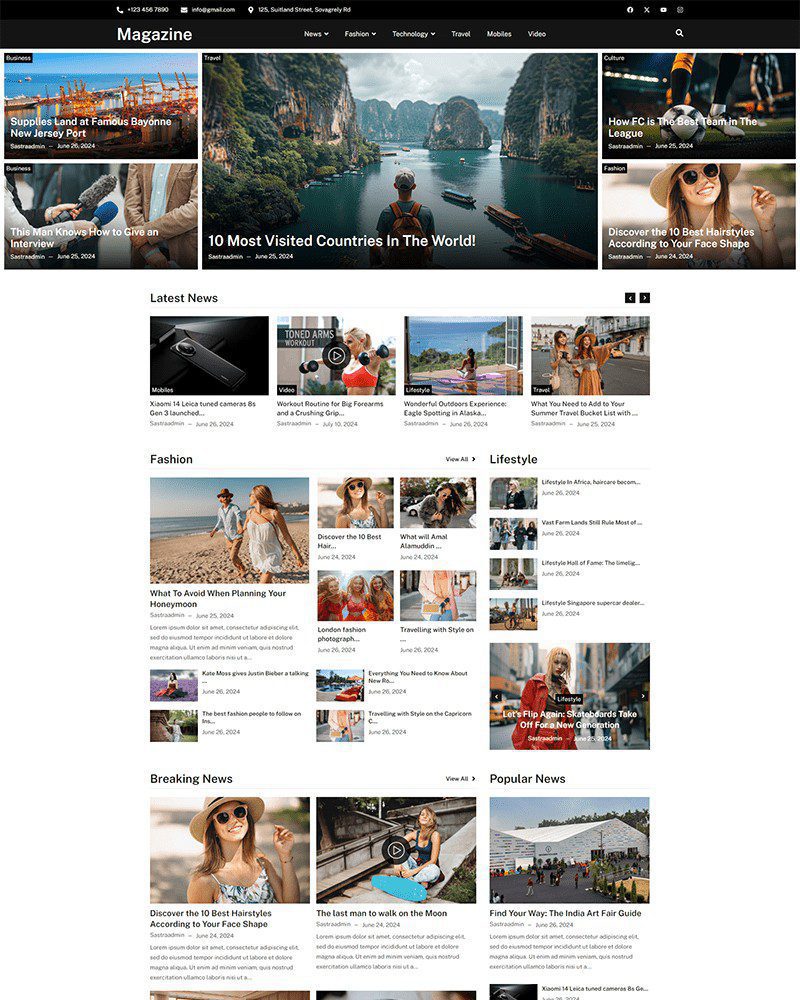
The News Portal Elementor Template is a free WordPress layout built around how editorial teams publish and organise content across multiple topics. It includes a featured article hero grid, category-based homepage sections, a top navigation with category links, thumbnail-and-headline article lists, and an ad-ready column structure. It runs on Elementor Free and the Spexo Addons plugin with no coding required.
Who this news portal template is for
This template fits independent digital publishers who cover multiple topics and need a homepage that surfaces content from each category simultaneously. A regional news outlet covering local politics, community events, and sport can use the category sections to give each vertical its own visible homepage placement. Online magazines covering lifestyle, travel, tech, and fashion will find the featured grid and category columns handle high publication frequency without the homepage becoming cluttered.
Niche content sites built around a single industry can use the category navigation to segment sub-topics. A tech news site can divide coverage into Hardware, Software, AI, and Reviews. A fashion publication can separate Editorial, Street Style, and Shopping. Newsletters expanding into a web presence for the first time can use the template to give their content a publication-quality home without commissioning a custom site build.
Content types this template supports
Breaking NewsFeatured hero placement with category badge and timestamp for time-sensitive stories.
Category ColumnsSeparate sections per topic so readers find their preferred vertical without scanning the full page.
Thumbnail ListsCompact headline and image format for high-volume sections like Latest News and Lifestyle.
Opinion and AnalysisAuthor-forward layout with byline, category label, and reading time visible on the card.
Photo JournalismFull-width image cards with caption overlay for visually driven stories and event coverage.
Ad Placement ZonesColumn sidebar and between-section positions ready for display ad widgets or sponsored content blocks.
How a news portal template differs from a blog template
A blog template is designed for sequential reading. Visitors arrive, read the latest post, and browse a paginated archive. A news portal template is designed for simultaneous discovery. Visitors arrive at a homepage that surfaces the most important story in each category at once so they can choose their own reading path. These are structurally different demands that require different layouts.
| Feature | Blog Template | News Portal Template |
|---|---|---|
| Homepage layout | Latest posts in a single feed | Featured hero grid with category sections |
| Navigation | Pages and tag links | Category-based top nav with topic links |
| Content volume | Optimised for a few posts per week | Handles multiple daily posts across topics |
| Editorial control | Chronological by publish date | Manual featured article placement by editors |
| Monetisation | Sidebar widget area | Multiple ad placement zones built into layout |
What is included in the News Portal template
- Homepage with featured hero grid, category sections, and Latest News column
- Category archive pages with filterable article lists and sidebar
- Single article page with featured image, author bio, and related posts
- Author profile page with bio, social links, and article history
- Search results page with article thumbnails and category filters
- About page for the publication and editorial team
- Contact page for reader submissions and advertising inquiries
- Sticky header with category navigation and search bar
Key features for news and magazine websites
Featured article hero grid with editorial placement control. The homepage hero section displays two large featured stories side by side with category badge labels and publish timestamps visible on each card. Below the hero, three smaller featured cards give editors a second editorial tier. Publishers choose which articles fill these positions manually rather than relying on chronological order. A major story stays featured for as long as the editors decide rather than being pushed down by newer posts in an automated feed.
Category navigation bar for multi-topic publications. The sticky header includes a horizontal category navigation row below the masthead. Readers click directly to their preferred section — News, Fashion, Tech, Travel — without returning to a homepage or using a search bar. Category pages display their own article grids with the same thumbnail-and-badge format as the homepage. A reader who visits daily for one section can navigate there in a single click from any page on the site.
Sidebar column structure ready for display advertising. The article listing pages and single post pages include a sidebar column positioned for standard IAB display ad sizes. Publishers using Google AdSense, Mediavine, or direct ad sales can place their ad widget in the sidebar without modifying the page layout. The sidebar also accommodates a popular posts widget, newsletter sign-up block, and social follow buttons in the remaining space below the ad unit.
How to install the News Portal Elementor Template
The full setup takes under 10 minutes from a fresh WordPress installation.
- Install the free Spexo theme from WordPress under Appearance > Themes
- Install and activate the Spexo Addons for Elementor plugin from the WordPress plugin directory
- Go to Spexo Addons > Prebuilt Websites in your WordPress admin panel
- Find the News Portal template and click Import Site
- Create your WordPress categories to match your publication’s topics, assign the category navigation links in the header to those categories, and set your first featured articles in the homepage hero grid using the Elementor editor
News Portal Elementor Template vs paid magazine themes
Paid news and magazine themes on theme marketplaces typically require a specific version of a premium page builder, a set of bundled plugins that need separate licences, and a child theme to make safe customisations. Publishers who buy a $49 magazine theme often spend more time resolving plugin conflicts and update breaks than they do publishing content in the first month. Also checkout library of free Elementor template kits.
The News Portal Elementor Template runs on Elementor Free and the free Spexo Addons plugin. There are no bundled plugin dependencies to license. Updates to Elementor and Spexo Addons do not break the template layout because the structure uses standard widgets rather than custom shortcodes that become orphaned when a plugin changes. Publishers focused on content output rather than site maintenance will find the simpler dependency stack saves significant time across a year of operation. For digital agency teams who also need a clean corporate or digital services layout alongside a publication site, the Digital Agency Elementor Template covers that positioning as a companion site or client work template.
Running multiple publications or client news sites?
The News Portal template is free for a single site. Spexo Pro gives you access to every template in the library plus Pro widgets under one license. Publishers operating more than one property or agencies building news and magazine sites for media clients can cover all projects without purchasing templates separately.
Live preview and screenshots
The live demo shows the full homepage hero grid, the category navigation header, the Latest News column, the Lifestyle section with thumbnail lists, and the single article page with sidebar. Browse the category archive pages in the preview to see how the layout handles a high volume of article cards before importing.
View the News Portal Elementor Template live demo to inspect every section before importing.
Frequently asked questions
Is the News Portal Elementor Template free?
Yes. The template is completely free to download and use. It works with the free Spexo theme and the free Spexo Addons plugin. A publisher or editorial team can launch a fully structured news site using this template with no licensing cost beyond standard WordPress hosting.
Can I control which articles appear in the featured hero section?
Yes. The featured hero grid on the homepage is built as an Elementor section where you manually assign the articles or posts that appear. Open the homepage in Elementor and update the featured post widgets with the articles you want to promote. Editors can rotate featured stories without touching any code or plugin settings. The change takes effect as soon as you save and publish the page.
How many categories can this template support?
The template supports as many WordPress categories as your publication uses. The category navigation bar in the header shows the category links you configure. For publications with more categories than fit in the top nav, you can add a dropdown menu using the Spexo Addons mega menu widget or the standard WordPress custom menu settings without editing the template code.
Can I place Google AdSense or other ad units in the layout?
Yes. The sidebar column on article listing and single post pages is sized for standard display ad units. Paste your AdSense code or any ad network widget code into a WordPress text widget and place it in the sidebar widget area. The layout positions the ad above the fold on desktop screens for the majority of article pages without any CSS adjustments needed.
Do I need Elementor Pro to use this template?
No. The News Portal template runs entirely on Elementor Free. The featured article grid, category section layouts, thumbnail article lists, sidebar column, and sticky header all work without an Elementor Pro subscription. A publication launching its first standalone web presence can use fully free tools from WordPress installation through to the first article going live.
Is the News Portal template mobile responsive?
Yes. The featured hero grid collapses from a two-column layout on desktop to a full-width single-column card stack on mobile. Category section columns also stack vertically on smaller screens. The sticky header retains the category navigation on tablet and switches to a hamburger menu on mobile. Readers browsing on a phone see the same article hierarchy as desktop readers without horizontal scrolling or content being cut off.