Popup Image
Popup Image

⚡ Build your WordPress website faster with Spexo Theme Free Download →

Coffee Store Elementor Template

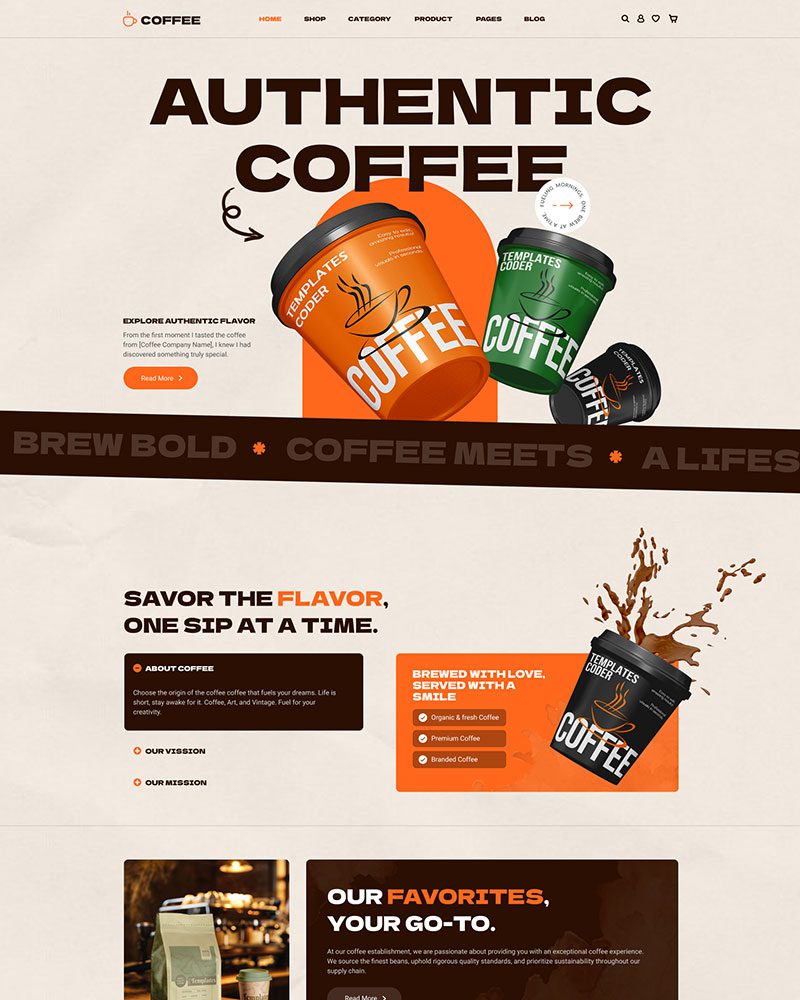
Launch a professional coffee shop website with this Elementor template. It’s designed for WooCommerce, responsive layouts, and easy site editing.

Premium Coffee Store Template for Elementor

This Coffee Store template is part of the Spexo Pro package. It is designed for users who need advanced layouts, better customization, and long-term reliability.

You get access to premium widgets, extended design controls, and priority updates. In real projects, Pro templates save time because you don’t need extra plugins for basic features.

Coffee Store Elementor Template
Coffee Online Store Elementor Template

Why Choose the Pro Coffee Store Theme

This template is built for serious store owners and agencies. It focuses on stability, scalability, and long-term maintenance.

With the Pro version, you avoid:

  • Limited customization
  • Missing layout controls
  • Frequent plugin conflicts
  • Design restrictions

You get a complete system instead of a basic starter theme.

Woo Commerce Integration for Coffee Stores

This coffee template is built for serious WooCommerce stores. It includes advanced product layouts, flexible shop grids, and dynamic content sections.

You can display featured blends, limited editions, and seasonal products more effectively. In real projects, basic templates struggle with complex catalogs. This one handles them well.

Coffee eCommerce Store Elementor Template
Best Coffee Store WordPress Theme

Multi-Currency and International Payments

If you sell internationally, this template supports:

  • Multi-currency plugins
  • Regional tax rules
  • Local payment gateways

Layouts remain stable after currency switching. This helps global expansion.

Priority Support for Pro Users

With the Pro version, you get access to priority support.

You can contact the support team for:

  • Setup issues
  • Layout problems
  • Compatibility questions
  • Bug reports

This matters when running a live store.

Coffee Woocommerce Elementor Template

Video Guide to Install Cofee Shop Template

Watch this step-by-step video to import the template, configure plugins, and launch your coffee shop website. Just few minutes and you are ready to go!

Common Questions About Coffee Theme

You can install it by first setting up the Spexo theme and required plugins. Then open the template library and import the coffee store layout. After that, customize it using Elementor.
In most cases, the full setup takes less than 10 minutes.

No. This template works with the free version of Elementor, Elementor pro not needed.
You only need Spexo Pro for installing this theme.

Yes. The layout is responsive and works on phones and tablets. Buttons and product sections remain easy to use.

Yes. It works with WooCommerce subscription plugins.

Coffee Store Elementor Template

Featured On

Award winning Elementor template designs.
wordpress-logo
Design Nominees Award
CSSLIGHT Award
BEST CSS Award
CSSREEL Award
Top Design King Award

What Comes with Every Spexo Elementor Template

Our free Spexo Elementor templates has an industry wise modern website structure. It comes with prebuilt pages such as About Us, home, services, Contact Us, blog, etc. Our Elementor themes have basic templates, such as a single blog page, Header and footer, 404 page, etc. We made it easier for the website to add new pages, adjust the current ones, and enhance its styles.

90+ widgets and extensions

Every Spexo template includes access to 90+ Elementor widgets and extensions. You get sliders, post grids, popups, form builders, and WooCommerce widgets in one install. No separate plugin purchases are needed to use them.

team-member

Elementor page builder integration

Spexo is built for Elementor from the ground up, so every design setting is pre configured when you import the template. You open Elementor and the layout, spacing, and typography are already in place. Edits start immediately without adjusting theme defaults first.

magazine-grid

50+ ready made Elementor templates

Spexo Addons includes a library of 50+ ready made Elementor templates covering a wide range of industries. Each template imports in one click from the Prebuilt Websites panel in your WordPress dashboard. You can also import individual page layouts from other templates to combine with this one.

woo-grid-1

Layout and column controls

Spexo gives you full control over column structure, spacing, and section layouts directly in Elementor. You can switch between boxed and full width layouts at the page level or the section level. No custom CSS is needed to adjust how content sits on the page.

data-table

Header and footer builder

Spexo includes a dedicated header and footer builder inside Elementor. You can create sticky headers, transparent headers, and custom footers without writing code. Any header or footer you build applies globally across the site unless you override it on a specific page.

lottie-animations

Fast loading and lightweight

Spexo loads fast because it does not load scripts and stylesheets your template does not use. Pages built on Spexo consistently score well on Core Web Vitals without extra optimization plugins. Global color and typography settings let you apply design changes across the entire template from one panel.

advance-accordion

Responsive design

Every Spexo template is fully responsive on mobile, tablet, and desktop. Column layouts, font sizes, and image ratios adjust automatically at each breakpoint. You can preview and edit the mobile layout directly in Elementor without touching code.

simple

Full design control

Every element of a Spexo template is editable through the Elementor drag and drop editor. You can change colors, fonts, spacing, images, and section order without touching any files. Global design settings in the Spexo theme customizer let you update site wide styles in one place.
product-rating

Built with SEO structure

Spexo templates are built with a clean heading structure and semantic HTML that search engines can read correctly. Each template uses a single H1, a logical H2 and H3 hierarchy, and properly labeled elements out of the box. The theme generates lean code so page load times stay fast, which is a direct search ranking factor.

have-fun

Regular theme and template updates

Spexo receives regular updates that cover compatibility with new versions of Elementor, WordPress, and WooCommerce. Updates are delivered through the standard WordPress plugin and theme update system. You can check the changelog for a full list of what each release covers.

Have any Questions?

Have any doubts about Spexo Addons Pro? Here are some frequently asked questions that should answer most of yours.

Yes, we provide you with a free Spexo theme.

Spexo theme is suitable for Elementor. You can explore list of elementor themes on our website. You can choose the best, most reliable, fast, and lightweight theme that fits your requirements.

Yes, we provide you with ready to use templates to create your websites in a few seconds.

When there are updates for our themes, you will get a notification on your WordPress backend.

Install the Spexo theme and Spexo Addons plugin on your WordPress site. Then import the template from the demo library with one click. Your pages will be ready to customize immediately after import.
No. The free version of Elementor works with this template. Spexo Addons provides the widgets and layout features used in the design. You do not need an Elementor Pro subscription to get started.
Yes. The template works with Elementor's drag and drop editor. You can change colors, fonts, images, and layout directly from the WordPress dashboard. No coding knowledge is required.
Yes. The template is built to work on all screen sizes. It adjusts automatically for mobile phones, tablets, and desktops. You do not need to make separate edits for each device.

Related Guides and Resources

Explore related documentation and guides to understand Elementor templates, setup steps, and real use cases. These resources help you build better website layouts with Elementor.

Checkout Other Elementor Templates

Get professionally designed ready-made Elementor Templates that can be imported in a few clicks and build websites faster than ever before!