
What is the Pet Grooming Elementor Template?
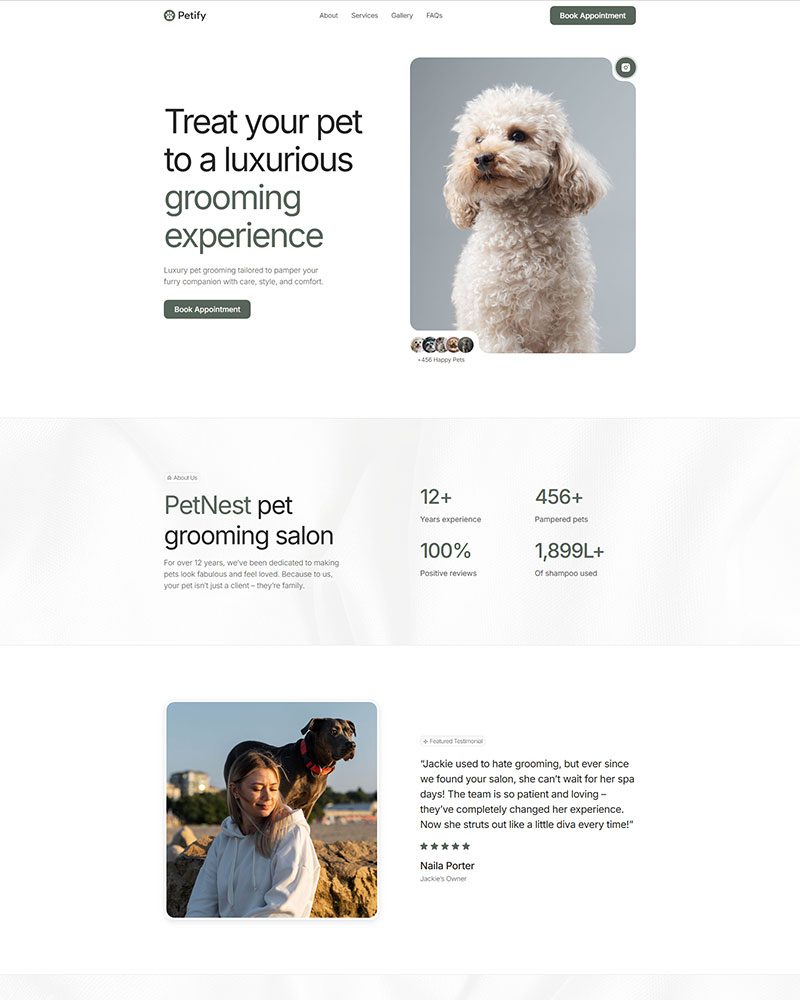
The Pet Grooming Elementor Template is a free WordPress layout built around the booking and service discovery journey that pet owners go through before choosing a groomer. It includes prebuilt sections for service packages, pricing tiers, testimonials, and appointment request forms. It runs on Elementor Free and the Spexo Addons plugin. No developer is needed to set it up or customize it.
Who this pet grooming template is for
This template fits independent pet grooming salons that want a professional online presence without paying an agency to build one. Mobile groomers who travel to clients’ homes can use the service area section to list the neighborhoods or zip codes they cover. Dog daycare and boarding facilities will find the pricing table layout useful for displaying overnight rates alongside grooming add-ons.
Veterinary clinics that offer grooming as a side service can add the template as a dedicated grooming landing page within their existing WordPress site. Pet spa operators who focus on premium treatments like blueberry facials, pawdicures, and coat conditioning can use the service description blocks to differentiate their offerings from a basic clip-and-bath groomer nearby.
What is included in the Pet Grooming template
- Homepage with hero section, services overview, and trust signals
- Services page listing grooming packages by pet size and coat type
- Pricing table with tiered packages for basic, standard, and premium grooming
- Testimonials section with star ratings and pet owner reviews
- Appointment request section with a booking inquiry form
- About page with groomer bio and credentials section
- Contact page with address, phone, map embed, and business hours
- Sticky header and footer with social links
Key features for pet grooming websites
Service package layout by pet size. The services section organizes grooming options by small, medium, and large breed categories. Each package block lists what is included: bath, blow dry, nail trim, ear cleaning, and optional add-ons. Pet owners can compare what they are getting at each price point before they call. This reduces the back-and-forth that wastes time for both the groomer and the client.
Pricing table designed for tiered grooming menus. Most grooming businesses offer three to four service tiers. The template includes a structured pricing block where each tier has a name, price, and bulleted feature list. You can name the tiers anything you want: Bath Only, Full Groom, or Spa Treatment. The layout makes pricing transparent and removes the number one objection that stops pet owners from booking.
Testimonials section with photo and breed context. The review blocks include a pet owner name, a short quote, and a field for the pet’s breed. A five-star review from “Sarah, owner of a Golden Retriever” carries more weight than a generic testimonial. This type of social proof is particularly effective in the pet care industry because breed-specific credibility matters to prospective clients.
Booking inquiry form built into the homepage. The appointment request section sits close to the pricing information so visitors can act immediately after reviewing your rates. The form collects pet name, breed, service type, and preferred appointment date. You connect it to any WordPress form plugin such as WPForms or Fluent Forms. No custom development is required.
How to install the Pet Grooming Elementor Template
You can have the template live and ready to customize in under 10 minutes.
- Install the free Spexo theme from WordPress under Appearance > Themes
- Install and activate the Spexo Addons for Elementor plugin from the WordPress plugin directory
- Navigate to Spexo Addons > Prebuilt Websites in your WordPress admin panel
- Find the Pet Grooming template and click Import Site
- Replace the placeholder grooming packages with your actual services, update pricing for each pet size tier, and upload photos of your salon or work
Pet Grooming Elementor Template vs paid ThemeForest kits
Paid pet care and grooming kits on ThemeForest typically cost between $19 and $39. They also require purchasing a compatible premium theme or Elementor Pro before the kit works correctly. The Pet Grooming Elementor Template from Spexo is completely free and works with Elementor Free. You pay nothing and get the same category of prebuilt layout at zero cost.
ThemeForest kits often include 15 to 20 pages across multiple industries to justify the price. Most pet grooming businesses need 5 to 8 focused pages. The Spexo template gives you exactly that without extra clutter. If you also offer spa treatments for pets and want a more luxury-oriented layout, see the Spa Elementor Template as a complementary option for that positioning.
Live preview and screenshots
The live demo shows the full homepage with the services overview, pricing table, testimonial section, and booking form. You can scroll through all pages to check how the layout handles your service categories before committing to the import.
View the Pet Grooming Elementor Template live demo to see every section before you import.
Frequently asked questions
Is the Pet Grooming Elementor Template free?
Yes. The template is free to download and use. It works with the free Spexo theme and the free Spexo Addons plugin. You do not need to purchase Elementor Pro or any premium add-on to get a fully functioning pet grooming website.
Can I take online bookings through this template?
Yes. The template includes a pre-styled appointment request form section. Connect it to any WordPress form plugin to receive booking inquiries by email or to a CRM. For full online scheduling with calendar availability, you can embed a booking tool like Amelia or Simply Schedule Appointments into the form area without redesigning the page.
Can I list different prices for different dog breeds or sizes?
Yes. The pricing table section is fully editable in Elementor. You can create separate columns for small, medium, large, and extra-large breeds. Each column accepts its own price and feature list. Updating the pricing later takes about two minutes in the Elementor editor without touching any code.
Does this template work for a mobile grooming business?
Yes. The services and about sections can be adapted for a mobile grooming van operation. Replace the salon address with a service area description and list the neighborhoods or cities you cover. The contact page map embed can point to your base location or you can replace it with a text-based service area list using the Elementor text widget.
Do I need Elementor Pro to use this template?
No. Every section in the Pet Grooming template uses Elementor Free widgets. The pricing table, testimonials, service cards, and booking form section all work without a Pro subscription. You can build and launch the full site using only free tools, keeping your startup costs as low as possible.
Is the pet grooming template mobile responsive?
Yes. The pricing table stacks vertically on mobile so each grooming tier displays as a separate card rather than a side-by-side column. The booking form resizes to fill the full screen width on phones. Grooming clients searching for a local groomer on their phone will see a properly formatted page that loads fast and is easy to navigate.
Can I add a photo gallery of grooming results?
Yes. The Spexo Addons plugin includes a gallery widget compatible with Elementor Free. You can add a before-and-after gallery section to any page by dragging the widget into the layout. A grooming results gallery builds visual trust with new clients who have not visited your salon before and want to see the quality of your work.