

WordPress 7.0 Armstrong launched on May 20, 2026. The internet immediately flooded with roundups listing every block and button. Most of them miss the bigger story: these two releases had completely different jobs. WordPress 6.9 released on December 2, 2025 as a performance release. WordPress 7.0 is a capability release. Knowing that split tells you which version improved your Core Web Vitals and what 7.0 actually unlocks. As of May 2026, WordPress powers 41.9% of all websites globally (W3Techs, May 2026).
Quick Answer: WordPress 7.0 vs 6.9
WordPress 7.0 Armstrong (May 2026) and WordPress 6.9 (December 2025) served different purposes. WordPress 6.9 focused on performance. It reduced block theme First Contentful Paint by 33.1% and cut RSS feed response time by 87%. WordPress 7.0 focuses on features and adds native AI integration, a redesigned admin dashboard and over 20 block editor improvements. Test for plugin compatibility before upgrading to 7.0 if you run custom blocks or WooCommerce.
Key Takeaways
- WordPress 6.9 (December 2025) delivered the platform’s biggest front end performance gains in years. Block theme FCP improved by 33.1% and RSS feed response time dropped 87% (Make WordPress Core, Nov 2025).
- WordPress 7.0 adds native AI integration, a major admin redesign and over 20 block improvements. It raises the PHP minimum to 7.4 and introduces 7 breaking changes that require testing before upgrading.
- Upgrade to 7.0 now if you are on PHP 7.4 or higher. Fix your PHP version first if you are still on 7.2 or 7.3 because WordPress 7.0 will not install on those versions.
At a Glance: WordPress 6.9 vs 7.0
| Feature | WordPress 6.9 | WordPress 7.0 |
|---|---|---|
| Released | December 2, 2025 | May 20, 2026 |
| Named after | Gene (musician) | Louis Armstrong |
| Primary focus | Performance and editor UX | AI integration and features |
| Minimum PHP | 7.2 | 7.4 (new requirement) |
| Recommended PHP | 8.1+ | 8.3+ |
| New blocks | Accordion, Math, Terms Query and Time to Read | Breadcrumbs, Icons and Navigation Overlay Close |
| Admin UI | Incremental changes | Major overhaul with new Modern color scheme |
| AI features | None | WP AI Client and Connectors admin screen |
| Breaking changes | Low | 7 significant changes |
| Tickets resolved | ~280 | 419+ Trac, 300+ bug fixes and 411 Gutenberg enhancements |
| React version | 18 | 19 |
| Real time collaboration | Not shipped | Cut entirely from 7.0 |
Which Version Improved WordPress Performance More?
WordPress 6.9 improved front-end performance more than WordPress 7.0. It shipped measurable gains for block themes, classic theme stylesheets, RSS feeds, and Core Web Vitals-related loading behavior. WordPress 7.0 improves the architecture behind blocks and developer tooling, but it does not have the same release-level front-end benchmark story.

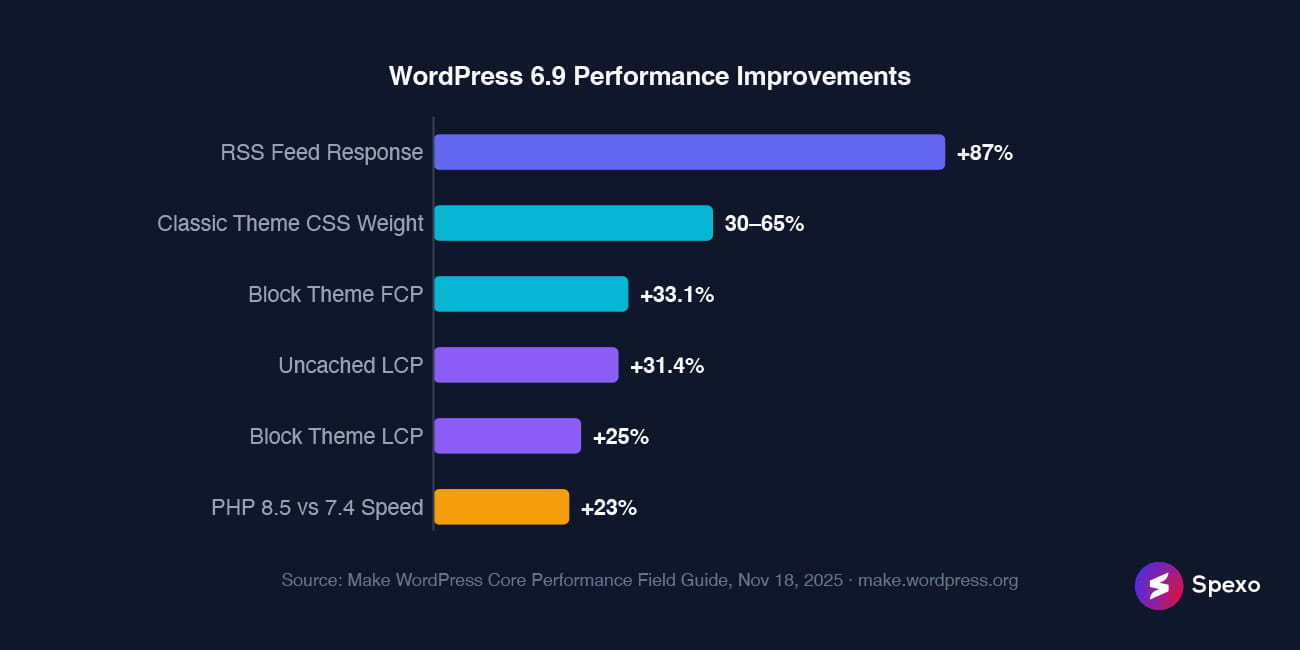
In December 2025, WordPress Core shipped one of its most important front-end optimization updates in recent years. Block theme First Contentful Paint improved by 33.1%. Largest Contentful Paint dropped by an average of 25% across block themes. On classic themes, switching to on-demand block CSS removed 30 to 65% of stylesheet weight from typical page loads. These numbers made WordPress 6.9 the stronger release for measurable front-end speed improvements.
The single biggest win in 6.9 was the RSS feed transient caching fix. RSS endpoints had been regenerating more work than needed on repeated requests. After the fix, response time dropped by 87%, and template processing time fell by 89.9% (Make WordPress Core, Nov 2025). For publishers, news sites, podcast sites, and content-heavy WordPress installs, that change alone made 6.9 a meaningful upgrade.
WordPress 7.0 has a different performance story. Its gains are more architectural than visible in front-end benchmarks. The block editor moved to React 19. PHP-only block registration reduced the JavaScript workflow needed for server-rendered blocks. The development toolchain also moved toward an esbuild-based build process for @wordpress/build. These changes matter for developers, but they do not replace the measured front-end wins shipped in 6.9.
For Elementor site owners, this means WordPress 6.9 may deserve more credit for loading improvements. WordPress 7.0 should be tested mainly for editor, plugin, WooCommerce, and custom-widget compatibility. If your site uses many Elementor widgets, forms, popups, carousels, or WooCommerce layouts, keep your lightweight Elementor addon stack updated before testing WordPress 7.0 on production.
Core updates help, but they do not fix every performance issue alone. Your theme, hosting, cache setup, image weight, plugin stack, and custom code still affect real-world loading speed. If you are rebuilding or cleaning up an Elementor site after a major WordPress update, start with a lightweight Elementor theme and test the final page with real Core Web Vitals data.
Verdict: WordPress 6.9 wins the performance category. WordPress 7.0 wins on rendering architecture and developer build tooling.
What New Blocks and Design Tools Did Each Version Add?
WordPress 7.0 wins decisively on block additions and design flexibility. In 2026, the Block Editor gained viewport based visibility controls. You can hide or show any block on mobile, tablet or desktop without touching a line of CSS. Per block custom CSS editing landed directly in the block inspector Advanced tab (WordPress 7.0 Field Guide, May 14, 2026). The Gallery block gained a full lightbox with slideshow mode and keyboard navigation. The Cover block now supports embedded YouTube and Vimeo video backgrounds with built in lazy loading.
WordPress 6.9 added four new blocks. The Accordion and Math blocks expanded content types while Terms Query and Time to Read rounded out the set. The real standout was the Notes system. It is an asynchronous block level commenting feature that lets editorial teams attach threaded discussions to specific blocks. Teams can resolve those discussions without leaving the editor. For agencies with review workflows, that feature made 6.9 worth the upgrade.
WordPress 7.0 shipped three new blocks: Breadcrumbs, Icons and Navigation Overlay Close. It also consolidated the Headings block to handle H1 through H6 in a single component. The Visual Revisions feature shows a slider comparison with color coded diffs. Green marks additions, yellow marks changes and red marks deletions. Reviewing pattern and template changes before publishing becomes much more intuitive.
What did not ship? Real time collaboration was cut entirely from 7.0 on May 7, 2026. Server load concerns, memory efficiency issues and recurring bugs during beta led to the decision. Block level Notes from 6.9 remain available. Simultaneous real time editing has no confirmed release date.
Verdict: WordPress 7.0 wins on block additions and design tools. WordPress 6.9 wins on editorial team workflow with the Notes system.
Which Version Overhauled the WordPress Admin Interface?
WordPress 7.0 wins. It is the most significant admin redesign in years. In 2026, WordPress shipped a new Modern admin color scheme with improved typography and contrast. View Transitions API animations make navigation between screens feel instant. A DataViews interface replaces WP_List_Table on Posts, Pages and Media screens (WordPress 7.0 Field Guide, May 14, 2026). The Command Palette shortcut (⌘K or Ctrl+K) moved to the admin bar. You can now access it from every screen in the dashboard rather than only from the editor.
WordPress 6.9’s admin changes were incremental: an expanded Command Palette, improved Site Editor drag and drop and cleaner keyboard navigation for accessibility. Meaningful improvements but not a visual overhaul.
In 2026, WordPress powers 59.5% of all CMS driven websites globally. That puts it ahead of every other CMS combined (W3Techs, May 2026). The 7.0 admin redesign addresses a longstanding issue: the dashboard needed to look like modern software. A dedicated Font Library page lets site owners install and manage typefaces from one screen. It works across block, hybrid and classic themes.
Verdict: WordPress 7.0 wins the admin redesign category decisively.
Does WordPress 7.0 Finally Add Native AI Integration?
WordPress 7.0 adds native AI integration for the first time. In May 2026, WordPress shipped the WP AI Client: a provider agnostic PHP library (wp_ai_client_prompt()) and JavaScript REST API interface. Plugins and themes can request text generation and image creation from any connected AI provider. Speech conversion and video generation are also supported (Make WordPress Core, March 24, 2026). A new Settings > Connectors admin screen is the connection hub. It supports OpenAI, Google Gemini and Anthropic as well as custom endpoints.
WordPress 6.9 had no AI native features. The 6.9 Abilities API was the infrastructure layer that 7.0 builds on top of. It created a standardized capability registry readable by AI integrations.
Lead architect Matias Ventura described WordPress 7.0 as laying the foundation for AI across the WordPress experience at launch. The framing is deliberate: 7.0 ships the plumbing rather than the finished product. Plugins built on wp_ai_client_prompt() inherit the site admin’s chosen provider and credentials automatically. Plugin developers do not need to ship their own API key management UI.
Verdict: WordPress 7.0 only. This entire feature category does not exist in 6.9.
What Changed for Developers Between 6.9 and 7.0?
WordPress 7.0 introduces the bigger developer facing changes. Some are additive and some are breaking. In 2026, the block development pipeline migrated from webpack to esbuild based @wordpress/build. Build times dropped significantly for large plugin projects (WordPress 7.0 Field Guide, May 14, 2026). PHP only block registration removes the JavaScript pipeline requirement entirely for server rendered blocks. Define the block in PHP and WordPress generates the inspector controls automatically.
WordPress 6.9’s developer additions were foundational rather than flashy. The Abilities API standardized how plugins declare capabilities in PHP and via REST. The Interactivity API received incremental improvements. Theme.json matured within the 6.x architecture without structural changes.
In 2026, WordPress Core Web Vitals pass rates sit at 94% for CLS. INP is at 91% and LCP is at 86% (FatLab, 2026). TTFB at 65% is the weakest metric. That is almost always a hosting configuration problem rather than a WordPress code issue. Developers targeting that metric should look at object caching and server side rendering before filing core bugs.
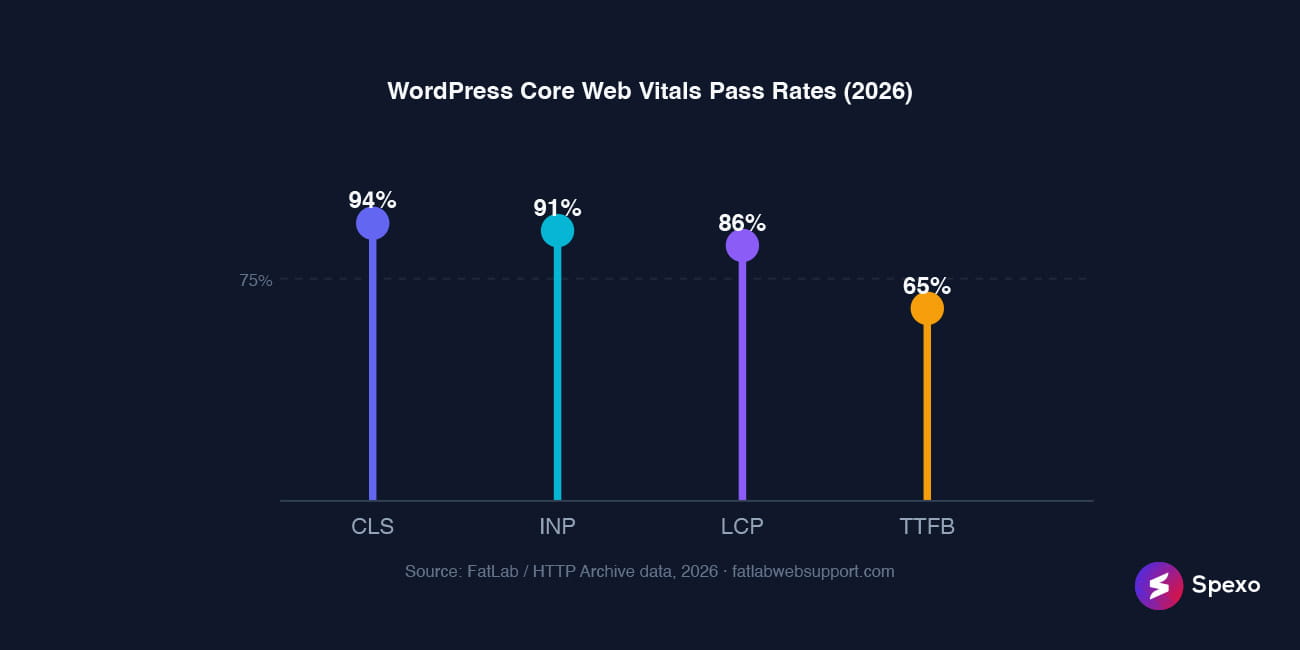
WordPress Core Web Vitals pass rates across all WordPress sites, 2026. Source: FatLab / HTTP Archive.
Verdict: WordPress 7.0 makes more significant developer changes. WordPress 6.9 built the Abilities API infrastructure that 7.0’s AI client depends on.
What Breaking Changes Does WordPress 7.0 Introduce?
WordPress 7.0 has seven breaking changes that require an audit before upgrading production sites. That is a significantly higher risk profile than 6.9, which had minimal compatibility concerns (Frontman, 2026).
The most impactful change is iframed editor enforcement for Block API v3 and later blocks. Classic meta boxes and plugins that relied on parent window globals, stylesheets or event listeners will break silently. The block simply will not render correctly. Migration path: use register_post_meta for data and PluginSidebar from @wordpress/edit-post for UI panels.
The remaining six breaking changes:
- PHP 7.2 and 7.3 dropped: WordPress 7.0 will not install on these PHP versions. Check your
phpinfo()or hosting control panel before scheduling the upgrade. - Interactivity API
state.navigationshorthand deprecated: Replace with awatch()call trackingstate.url. - HTML5 script theme support deprecated and removed (Trac #64442).
- DataViews replaces
WP_List_Tableon Posts, Pages and Media screens: Any plugin extending core list tables viaWP_List_Tablehooks needs testing. - React 19 in the block editor: May break custom block code targeting older React APIs.
- Administrator and Editor roles removed from new user defaults: Affects automated user creation flows in membership plugins.
In 2025, 39% of WordPress sites that were hacked were running outdated core versions (Colorlib, 2025). Delaying the upgrade is not cost free. Upgrading without testing plugin compatibility first is also risky. Staging is the answer, not procrastination.
Safe upgrade order: Update all plugins to their latest versions while still on 6.9. Test on a staging environment. Then update WordPress core to 7.0.
Verdict: WordPress 7.0 carries meaningfully higher upgrade risk than 6.9. Staging environment testing is mandatory for sites with custom code or major plugins.
Who Should Upgrade to WordPress 7.0 Right Now?
The right timing depends on what you have built and what is running it.
Bloggers and content sites on managed hosting: Upgrade now. Managed hosts keep PHP current so the version requirement is not a blocker. The admin redesign and new block features are immediately useful with near zero breaking change risk.
WooCommerce store owners: Wait 2 to 4 weeks. Confirm WooCommerce 10.4.2 or higher is installed first. Then upgrade WordPress core. Test product pages, cart and checkout in staging before touching production.
Agencies managing custom client sites: Test on staging first. Check every custom meta box and custom block for iframed editor compatibility. Budget 30 to 60 minutes per site for the compatibility audit. That is faster than recovering from a production rollback.
Developers using the Interactivity API: Audit state.navigation usage and replace with watch() before upgrading. One afternoon of work prevents a broken production deployment.
Sites on PHP 7.2 or 7.3: Fix PHP first. Both versions passed end of life in December 2021 and receive no security patches. Upgrade to PHP 8.1 at minimum and PHP 8.3 is recommended. Then upgrade WordPress core to 7.0.
Frequently Asked Questions
Yes, for most sites. WordPress 7.0 delivers a better editing experience, native AI integration and a modernized admin dashboard that 6.9 does not offer. The one exception is sites with custom blocks or plugins extending WP_List_Table. Those need a compatibility audit on staging before the production upgrade.
Not directly. Most Core Web Vitals gains in 2026 came from WordPress 6.9. It reduced block theme FCP by 33.1% and average LCP by 25% (Make WordPress Core, Nov 2025). WordPress 7.0 performance improvements are architectural rather than immediately measurable on the front end. Upgrading to 7.0 alone will not move your Core Web Vitals numbers. Upgrading PHP to 8.3 alongside it will.
It was cut. The multi user simultaneous editing feature was planned for 7.0 but was removed on May 7, 2026. Server load concerns, memory efficiency issues and recurring bugs during beta led to the decision. Block level Notes from 6.9 remain available. Real time simultaneous editing has no confirmed release date.
No. WordPress 7.0 dropped support for PHP 7.2 and 7.3 (Make WordPress Core, Jan 9, 2026). The minimum is now PHP 7.4 and PHP 8.3 is recommended. Both 7.2 and 7.3 reached end of life in December 2021 with no security patches since.
Yes. The Modern color scheme, View Transitions animations and DataViews interface in WordPress 7.0 apply to wp-admin globally. Your front end theme choice has no effect on the backend dashboard. The Font Library page is also theme independent and works across block, hybrid and classic themes.
Verdict: WordPress 7.0 vs WordPress 6.9
| Category | Winner | Reason |
|---|---|---|
| Raw performance | WordPress 6.9 | 33% FCP improvement, 25% LCP improvement and 87% RSS improvement. Measured and verified. |
| Block editor additions | WordPress 7.0 | 20+ block improvements, viewport controls and lightbox gallery |
| Admin interface | WordPress 7.0 | Major visual overhaul, DataViews and View Transitions |
| AI integration | WordPress 7.0 | Native WP AI Client and Connectors screen. WordPress 6.9 has none. |
| Developer tooling | WordPress 7.0 | esbuild pipeline, PHP only blocks and React 19 |
| Editor workflow | WordPress 6.9 | Notes system for async editorial collaboration |
| Upgrade safety | WordPress 6.9 | 7 breaking changes in 7.0 versus minimal in 6.9 |
| Overall | WordPress 7.0 (for most sites) | Feature density and admin modernization outweigh upgrade complexity |
WordPress 7.0 is the right upgrade target for almost every site. Test compatibility first if you have custom blocks, WooCommerce or plugins that extend core admin tables. If you skipped 6.9 entirely, upgrading directly to 7.0 still gets you the 6.9 performance gains. Improvements accumulate across major versions.
Sources
- WordPress 7.0 Armstrong Official Announcement — WordPress.org, May 20, 2026
- WordPress 7.0 Field Guide — Make WordPress Core, May 14, 2026
- Introducing the AI Client in WordPress 7.0 — Make WordPress Core, March 24, 2026
- WordPress 6.9 Frontend Performance Field Guide — Make WordPress Core, Nov 18, 2025
- Dropping Support for PHP 7.2 and 7.3 — Make WordPress Core, Jan 9, 2026
- WordPress Usage Statistics — W3Techs, May 2026
- WordPress 7 Breaking Changes — Frontman, 2026
- WordPress Statistics 2025 — Colorlib, 2025
- WordPress Core Web Vitals Benchmarks — FatLab, 2026




