Popup Image
Popup Image

⚡ Build your WordPress website faster with Spexo Theme Free Download →

Free Sports Coach Elementor Template for WordPress

This free Sports Coach Elementor template helps you create a coaching or fitness website quickly. It includes ready sections for programs, trainers, and schedules. You can customize everything easily using Elementor without coding.

What is the Sports Coach Elementor Template?

The Sports Coach Elementor Template is a free WordPress layout structured around how potential clients evaluate a coach before making contact. It puts your credentials, training programs, athlete results, and session pricing on a single fast-loading site. It runs entirely on Elementor Free and the Spexo Addons plugin. No paid theme or developer is required.

Who this sports coach template is for

This template fits independent personal trainers who work with athletes one-on-one and need a site that showcases credentials and client results. Strength and conditioning coaches at private facilities use the program listings to explain each training track without writing a brochure. Youth sports academies running seasonal programs for football, basketball, or swimming benefit from the schedule section that displays training blocks and registration windows. Online coaches who deliver programming through apps or spreadsheets can use the template to explain their remote training methodology and pricing. Nutritionists who pair coaching with meal planning find the add-on service blocks useful for presenting bundled packages. The layout works equally well for a solo coach operating out of a garage gym and a multi-coach academy with 10 staff members.

What is included in the Sports Coach template

  • Homepage with hero section, coach credentials, and program highlights
  • Training programs page with descriptions, goals, and session frequency
  • Coach profile section with bio, certifications, and athlete success stories
  • Schedule or timetable section for weekly training slots
  • Pricing page with per-session and monthly package options
  • Testimonials section with athlete name and sport or goal context
  • Contact and inquiry page with a booking request form
  • Sticky header and footer with social media links

Key features for sports coaching websites

Credentials and certification display built into the coach profile. Athletes and parents decide whether to trust a coach within the first 30 seconds on a website. The coach profile section includes space for certification logos, years of experience, and specific sports or disciplines coached. Listing a NSCA-CSCS certification or a UEFA coaching badge next to your photo converts visitors who arrived skeptical into visitors who fill out the inquiry form. Training program cards with outcome-focused descriptions. Each program card in the template includes a title, target athlete type, session structure, and a primary goal such as speed development or strength base building. Vague program names like “Package A” and “Package B” lose clients. Specific descriptions like “8-Week Sprint Mechanics Program for Track Athletes” tell the right person immediately that this is for them. Session schedule layout for group and one-on-one slots. The timetable section displays weekly availability in a scannable format. Parents booking youth sessions and adult athletes fitting training around work schedules make faster decisions when they can see open slots at a glance. You update the schedule directly in the Elementor editor without installing a separate calendar plugin for basic availability display. Athlete testimonial blocks with sport-specific context. The testimonial section includes a result statement alongside each review. “Lost 12kg in 16 weeks” or “Improved 40m sprint time from 5.4s to 5.0s” next to an athlete’s photo is more persuasive than a five-star rating alone. This kind of outcome-specific social proof is the primary trust signal for performance coaching websites.

How to install the Sports Coach Elementor Template

You can complete the full setup in under 10 minutes with no technical background needed.
  1. Install the free Spexo theme from WordPress under Appearance > Themes
  2. Install and activate the Spexo Addons for Elementor plugin from the WordPress plugin directory
  3. Go to Spexo Addons > Prebuilt Websites in your WordPress admin panel
  4. Locate the Sports Coach template and click Import Site
  5. Update the training program descriptions with your actual sessions, replace the coach photo and certification details with your own credentials, and set your session pricing for each package tier

Sports Coach Elementor Template vs building a custom coaching site

A freelance web designer building a custom coaching site from scratch typically charges between $800 and $2,500 for a project of this scope. Timeline is usually 3 to 6 weeks. The Sports Coach Elementor Template delivers the same page types (program listings, coach bio, schedule, testimonials, and inquiry form) as a free import that is live in under an hour. That time and cost difference is material for a coach just starting to take on private clients.

For coaches who also run group fitness or wellness sessions alongside athletic training, the Yoga Studio Elementor Template covers class scheduling and wellness program presentation if you need a layout oriented around group bookings rather than individual athletic performance.

Live preview and screenshots

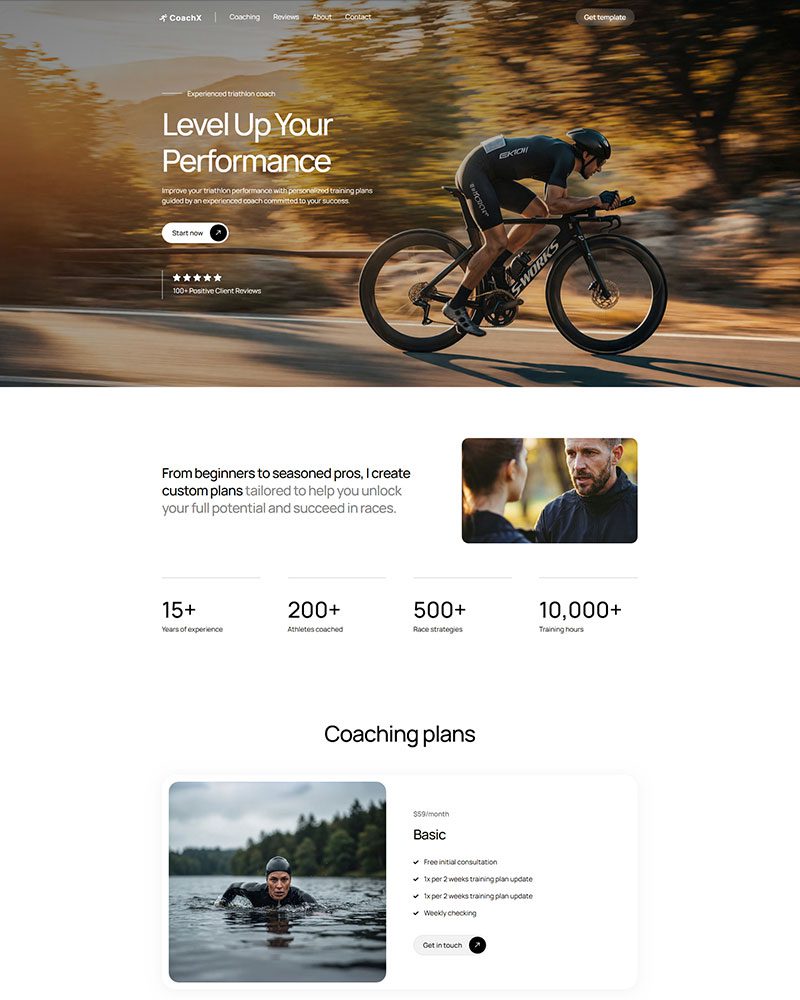
The live demo shows the complete homepage layout including the hero section with CTA, the training programs grid, the coach credentials block, and the testimonials row. Check the mobile view inside the preview to confirm how the schedule and pricing tables render on phones before you import. View the Sports Coach Elementor Template live demo to walk through every page before importing.

Frequently asked questions

Is the Sports Coach Elementor Template free?

Yes. The template is free to download and publish. It works with the free Spexo theme and the free Spexo Addons plugin. You do not need an Elementor Pro subscription or any premium add-on to run a complete coaching website with this template.

Can I list multiple coaches or trainers on the site?

Yes. The coach profile section is built as a repeatable block in Elementor. Duplicate the section for each staff member and fill in each person’s photo, bio, certifications, and specialisation. A multi-coach academy can present 5 to 10 staff profiles on a single page without writing any code or installing a staff directory plugin.

Can I take online payments for coaching packages through this template?

Yes. Connect WooCommerce to your WordPress site and add a product for each coaching package. Link the template’s pricing section CTA buttons to the corresponding WooCommerce product pages. Clients pay online at checkout using Stripe, PayPal, or any other WooCommerce payment gateway. The template layout does not need to change for this to work.

Does this template work for online coaching as well as in-person training?

Yes. The program description blocks are fully editable so you can label sessions as remote, in-person, or hybrid. Online coaches typically replace the location map with a “How it works” process section explaining how they deliver programming. Elementor’s drag-and-drop editor makes that substitution in about 10 minutes.

Is the Sports Coach template mobile responsive?

Yes. The training program grid switches from a 3-column layout on desktop to a single-column stack on mobile so each program card is fully readable without zooming. The session schedule also collapses to a day-by-day vertical list on smaller screens. Athletes checking the site on their phone between sessions see a clean layout that does not require horizontal scrolling.

Do I need Elementor Pro to use this template?

No. Every widget used in the Sports Coach template is part of the free Elementor version. The program cards, testimonial blocks, schedule section, and contact form area all work without upgrading. This is particularly useful for new coaches who want to keep overheads low while they build their client base.

Can I change the colors to match my coaching brand?

Yes. Open Elementor and navigate to Site Settings to access the Global Colors panel. Update your primary brand color once and every button, heading, and accent element across all pages updates simultaneously. Sports and fitness brands often switch the default to a high-energy color like black with an orange accent or navy with a yellow highlight. The global settings make that rebrand take under 5 minutes.

Featured On

Award winning Elementor template designs.
wordpress-logo
Design Nominees Award
CSSLIGHT Award
BEST CSS Award
CSSREEL Award
Top Design King Award

What Comes with Every Spexo Elementor Template

Our free Spexo Elementor templates has an industry wise modern website structure. It comes with prebuilt pages such as About Us, home, services, Contact Us, blog, etc. Our Elementor themes have basic templates, such as a single blog page, Header and footer, 404 page, etc. We made it easier for the website to add new pages, adjust the current ones, and enhance its styles.

90+ widgets and extensions

Every Spexo template includes access to 90+ Elementor widgets and extensions. You get sliders, post grids, popups, form builders, and WooCommerce widgets in one install. No separate plugin purchases are needed to use them.

team-member

Elementor page builder integration

Spexo is built for Elementor from the ground up, so every design setting is pre configured when you import the template. You open Elementor and the layout, spacing, and typography are already in place. Edits start immediately without adjusting theme defaults first.

magazine-grid

50+ ready made Elementor templates

Spexo Addons includes a library of 50+ ready made Elementor templates covering a wide range of industries. Each template imports in one click from the Prebuilt Websites panel in your WordPress dashboard. You can also import individual page layouts from other templates to combine with this one.

woo-grid-1

Layout and column controls

Spexo gives you full control over column structure, spacing, and section layouts directly in Elementor. You can switch between boxed and full width layouts at the page level or the section level. No custom CSS is needed to adjust how content sits on the page.

data-table

Header and footer builder

Spexo includes a dedicated header and footer builder inside Elementor. You can create sticky headers, transparent headers, and custom footers without writing code. Any header or footer you build applies globally across the site unless you override it on a specific page.

lottie-animations

Fast loading and lightweight

Spexo loads fast because it does not load scripts and stylesheets your template does not use. Pages built on Spexo consistently score well on Core Web Vitals without extra optimization plugins. Global color and typography settings let you apply design changes across the entire template from one panel.

advance-accordion

Responsive design

Every Spexo template is fully responsive on mobile, tablet, and desktop. Column layouts, font sizes, and image ratios adjust automatically at each breakpoint. You can preview and edit the mobile layout directly in Elementor without touching code.

simple

Full design control

Every element of a Spexo template is editable through the Elementor drag and drop editor. You can change colors, fonts, spacing, images, and section order without touching any files. Global design settings in the Spexo theme customizer let you update site wide styles in one place.

product-rating

Built with SEO structure

Spexo templates are built with a clean heading structure and semantic HTML that search engines can read correctly. Each template uses a single H1, a logical H2 and H3 hierarchy, and properly labeled elements out of the box. The theme generates lean code so page load times stay fast, which is a direct search ranking factor.

have-fun

Regular theme and template updates

Spexo receives regular updates that cover compatibility with new versions of Elementor, WordPress, and WooCommerce. Updates are delivered through the standard WordPress plugin and theme update system. You can check the changelog for a full list of what each release covers.

Have any Questions?

Have any doubts about Spexo Addons Pro? Here are some frequently asked questions that should answer most of yours.

Yes, we provide you with a free Spexo theme.

Spexo theme is suitable for Elementor. You can explore list of elementor themes on our website. You can choose the best, most reliable, fast, and lightweight theme that fits your requirements.

Yes, we provide you with ready to use templates to create your websites in a few seconds.

When there are updates for our themes, you will get a notification on your WordPress backend.

Install the Spexo theme and Spexo Addons plugin on your WordPress site. Then import the template from the demo library with one click. Your pages will be ready to customize immediately after import.
No. The free version of Elementor works with this template. Spexo Addons provides the widgets and layout features used in the design. You do not need an Elementor Pro subscription to get started.
Yes. The template works with Elementor's drag and drop editor. You can change colors, fonts, images, and layout directly from the WordPress dashboard. No coding knowledge is required.
Yes. The template is built to work on all screen sizes. It adjusts automatically for mobile phones, tablets, and desktops. You do not need to make separate edits for each device.

Related Guides and Resources

Explore related documentation and guides to understand Elementor templates, setup steps, and real use cases. These resources help you build better website layouts with Elementor.

Checkout Other Elementor Templates

Get professionally designed ready-made Elementor Templates that can be imported in a few clicks and build websites faster than ever before!