
Adding Custom JavaScript to the Spexo Theme
Custom JavaScript (JS) lets you add advanced features and functionality to your website—such as animations, tracking codes, dynamic behavior, or third-party integrations—without editing any theme files.
The Spexo Theme allows you to safely insert JavaScript globally through the WordPress Dashboard. You can choose whether your scripts appear in the <head> or just before the closing </body> tag.
Where to Add Custom JavaScript #
To access the Custom JS settings:
- Go to your WordPress Dashboard
- Navigate to:
Spexo Addons → Global Options → Custom JS
or
Appearance → Global Options → Custom JS (if Spexo Addons is not installed)
You’ll see two input boxes for adding JavaScript:
- Add JS Under
<head>
Use this for scripts that need to load early (e.g., fonts, global config variables). - Add JS Before
</body>
Use this for scripts that run after content loads (e.g., animations, sliders, tracking).
How to Use:
- Choose the appropriate input box (
<head>or</body>) - Paste your raw JavaScript code into the field
- Click Save Changes
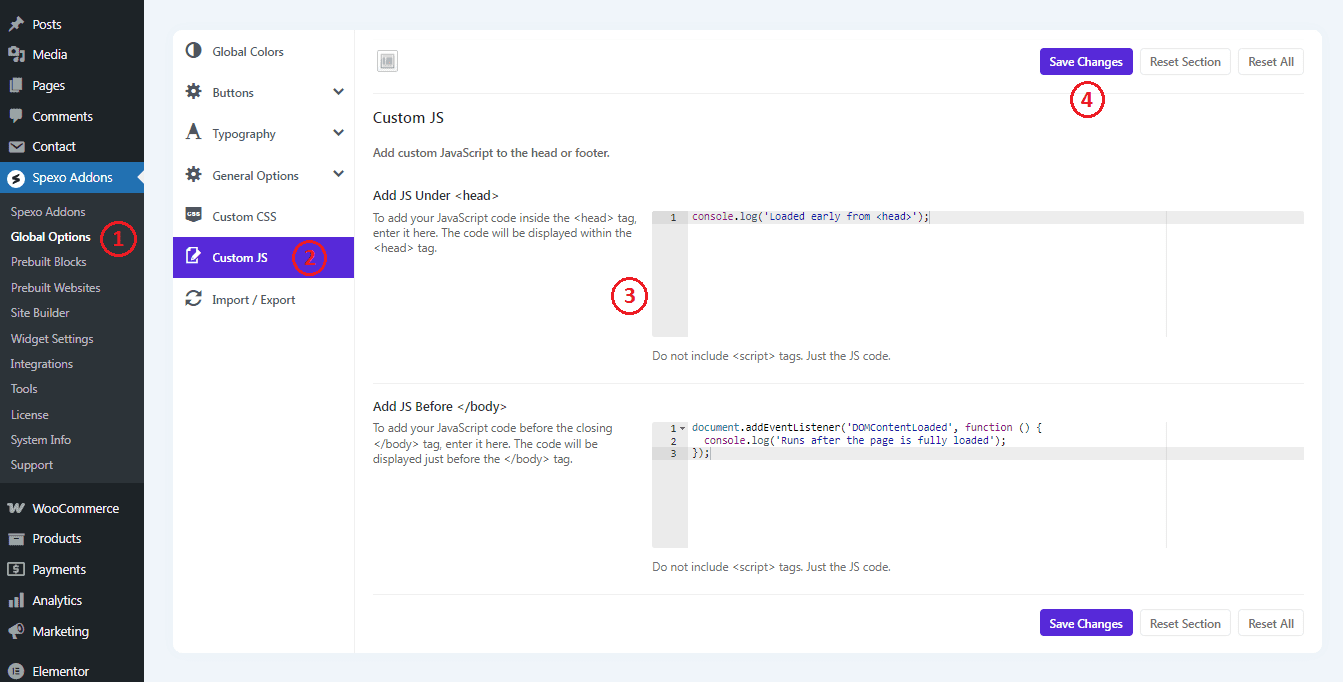
⚠️ Important: Do not include <script> tags. Just paste the JavaScript code directly.
Example #
Under <head>
console.log('Loaded early from <head>');
Before </body>
document.addEventListener('DOMContentLoaded', function () {
  console.log('Runs after the page is fully loaded');
});
When to Use Which #
| Use Case | Placement |
|---|---|
| Fonts, configuration, early setup | Under <head> |
| DOM interaction, animations, tracking | Before </body> |
Need help? Feel free to contact our support team — we’re always here to assist!


